Chapter 5: Static websites
This chapter covers:
Section titled “This chapter covers:”- Creating and managing static websites with Amazon S3
- Distributing and caching your website with Amazon CloudFront
- Adding a custom domain name with Route53
- Adding SSL/TLS with AWS Certificate Manager
- Collecting and managing your access logs
Here’s the thing: It’s a lot harder to get a website onto the internet today than it used to be.
I’m a bit of an old-timer on this, but I do think it’s true. In the early days of the web, if you had a computer connected to the internet, you had all you needed to run your own website: a program running on that computer that could listen for and respond to requests on port 80, and, ideally, an IP address that didn’t change. If you could figure that out, then you had all you needed to stake your claim on the public web. I built my first website on a desktop computer running Windows 98 with Microsoft Personal Web Server, and I served that site from the same machine over a cable connected to the wall of my apartment1. When it was time to update the site, I’d open an HTML file in Notepad, make a few changes, hit Save, and that was it — my changes were live. Years later, when I found myself building websites for a living, the technology might’ve been a bit fancier — pricier servers in commercial data centers, faster connections, and so on — but the underlying mechanics were still the same: a bunch of files sitting on a computer connected to the internet, and a software program listening on port 80 to serve them. Simple.
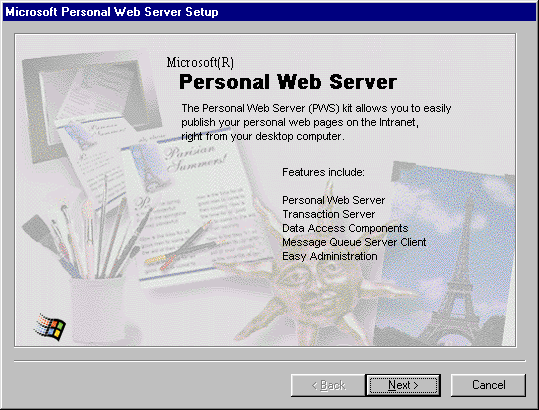
Figure 5.1: Microsoft Personal Web Server, circa 2000.
Not so anymore — at least not where the cloud is involved. Even though the cloud is ultimately just a bunch of computers connected to the internet, and a static website is still just a bunch of files sitting on one of those computers, we (as website creators) no longer work with those computers directly. Instead, we work with abstractions. What used to be easy — write a file, save a file, upload the file to the server, and be done — has become surprisingly complicated. In exchange for its power and reach, the cloud has managed to take what used to be a pretty easy task — writing and uploading web pages — and turn it into one so complex that whole companies2 have sprung up just to save us from having to deal with the complexity and tedium of all of it. Some of that complexity, to be fair, is probably warranted; it probably isn’t a great idea to be serving websites from our apartments on personal computers anymore. But it’s definitely a lot more complicated than you might think.
So in this chapter, we’ll take a look at how to do it. We’ll take on the task of building and managing a static website, and in the process, handle many of the real-world challenges you’ll face as you migrate from the comfort of localhost and out into the world.
First, you need a website
Section titled “First, you need a website”Sometimes a website is just a single index.html:
<html> <title>Hello, world!</title> <body> <!-- Loads of interesting content here --> </body></html>But let’s be honest: even truly static websites are almost never this simple anymore. Sometimes, yes, they’re just a handful of web pages. But more often, especially today, a single-page website is a full-blown application in its own right, with complex build processes — template rendering, asset compilation, minification, etc. — and rich client-side functionality that typically requires specific tuning at the web-server level in order to work properly.
When I set out to build a new site, I almost always use a generator of some sort — a program capable of producing the minima
Footnotes
Section titled “Footnotes”-
… back when consumer ISPs would support this sort of thing. ↩
-
Heroku (https://heroku.com), Netlify (https://netlify.com), Vercel (https://vercel.com), and many others. ↩